The findings list
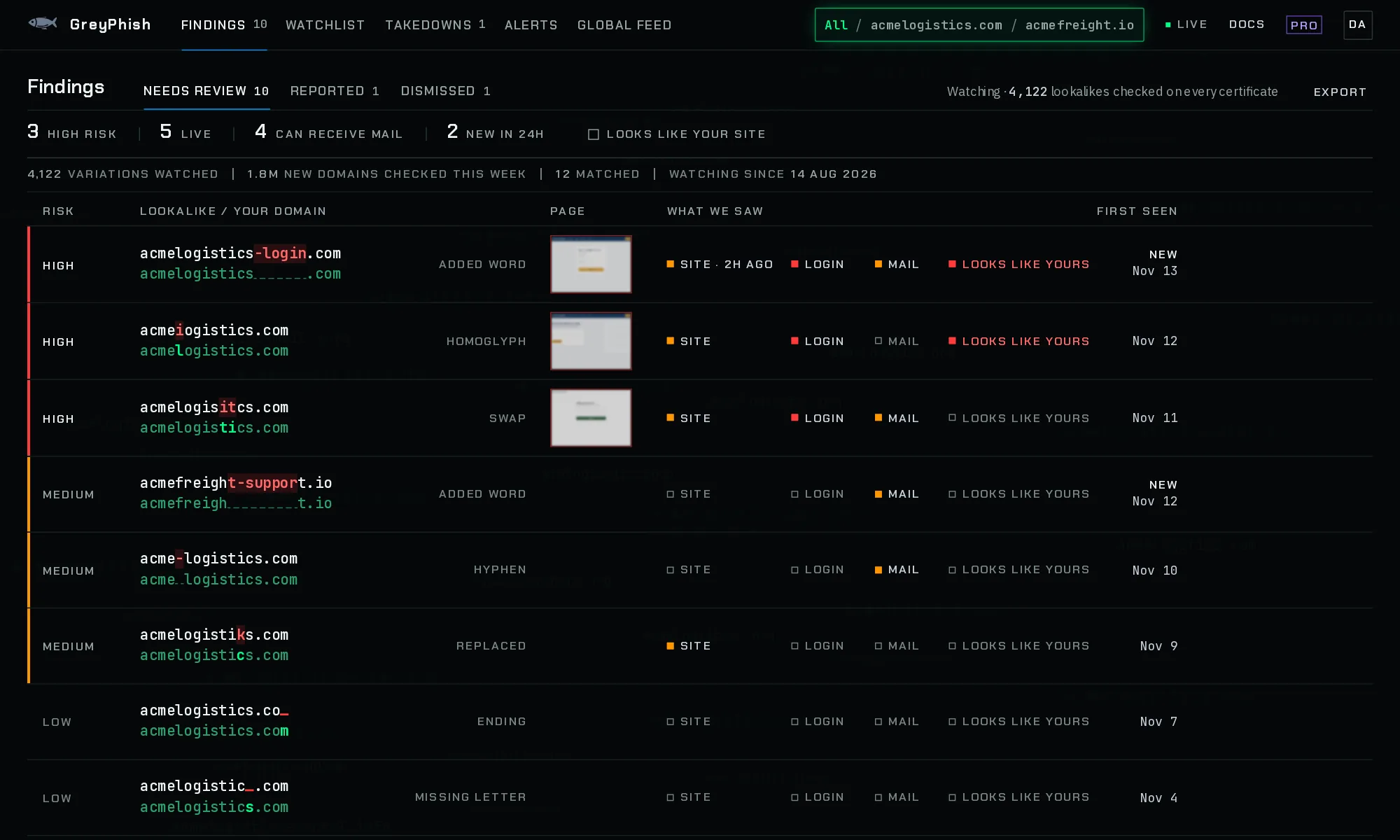
Every lookalike of the domains you watch in one list: three tabs, four counts that filter, and rows that line each lookalike up over your own domain.
Updated
What the list shows
Findings in the top bar lists every lookalike of the domains you watch, one row each, the highest risk first and, within a risk, the newest first. The domain switcher narrows it to one watched domain. Click a row to open the finding view.
- Free
- Every lookalike, its risk and signals
- Pro
- All of that, plus screenshot thumbnails and Export
- Business
- All of that, plus screenshot thumbnails and Export
- MSP
- Same as Pro
Tabs
- Needs review
- Everything you have not reported or dismissed. The number beside Findings in the top bar is this count. When it is empty because everything is reported or dismissed, it shows Nothing needs review with those figures.
- Reported
- A report is recorded for it in the finding’s Takedown section (you pressed I sent this), or a Netcraft report was submitted and did not fail. The row says when and to whom, for example “Reported Nov 3 · sent to registrar”. See tracking cases.
- Dismissed
- Marked Not a threat or This is mine. See dismissing findings.
The counts that filter
Four counts sit above the list, taken from the Needs review tab. Each is also a filter: click it to show only those findings, click it again to clear it. Choosing one switches to Needs review.
- High risk
- Findings at high risk. See risk levels.
- Live
- The lookalike serves a website.
- Can receive mail
- It publishes mail servers (MX records), so mail sent to it is delivered.
- New in 24h
- First seen in the last 24 hours.
- Looks like your site
- A separate switch beside the counts: only findings whose page matched your site on look or icon, by a measured score. See similarity.
While a filter is on, the strip says “Showing N of M”, with Clear to remove the filters.
The coverage line
Under the counts, one line says how many variations of the selected domains are watched, how many new domains were checked in the last seven days, how many lookalikes have matched, and since when the domain has been watched. The checked count is the same for every watched domain. See coverage.
Each row
- Risk
- High, Medium or Low; Checking before the first DNS and web check has finished; Below threshold for a match that scored too low to alert on. High and medium rows have a coloured edge.
- Lookalike over your domain
- The lookalike on the first line and the watched domain it imitates under it, shown whole (on a phone it sits in the top line of the card, before the risk). The characters that differ are marked in red on the lookalike. A letter the lookalike leaves out shows as a red underline. Beside it, the technique, such as Swap, Missing letter, Added word or Ending.
- Page
- On paid plans, a small, slightly blurred thumbnail of the lookalike’s newest screenshot, when there is one. On a free account, a Pro box on rows with a live site. On paid plans, a lookalike without a screenshot shows a short note in its place: “No live site”, “Dismissed, no screenshot”, “Score too low for a screenshot”, “Screenshot queued” or “Screenshot failed, retrying”. A row that has not had its first check yet, or is not a registered domain of its own, has no note. See why a finding has no screenshot.
- What we saw
- The four signal marks, below.
- First seen
- The day it was first seen, and New when that was in the last 24 hours.
- Report, Dismiss
- On Needs review rows. Report opens the finding at its Takedown section. Dismiss marks it Not a threat at once, with Undo in the notice. Other tabs show the row’s status instead.
The four signal marks
Each mark is filled when it applies and empty when it does not, so the four line up down the list.
- Site
- It serves a website. "Site · 3h ago" when it went live in the last day. When it does not, the mark reads Parked or Down where that is known.
- Login
- Its page has a password field.
- It can receive mail: it publishes MX records.
- Looks like yours
- Its screenshot matched your site on look or icon. Paid plans only, since only their findings are rendered.
Marks show what the last check saw. They are evidence, not a verdict that a site is malicious.
Export
Export, at the right of the tabs, downloads your findings as a domain list, a hosts file or a CSV, on paid plans. On a free account it reads Export (Pro). See exports.
Limits
- The list loads your newest 500 findings, dismissed ones included. A link to an older finding still opens it.
- New hosts on your own domain are not in this list. They are on each domain’s report, opened from the Watchlist.
- Counts and marks are from the last check of each lookalike, about once a day.