The finding view
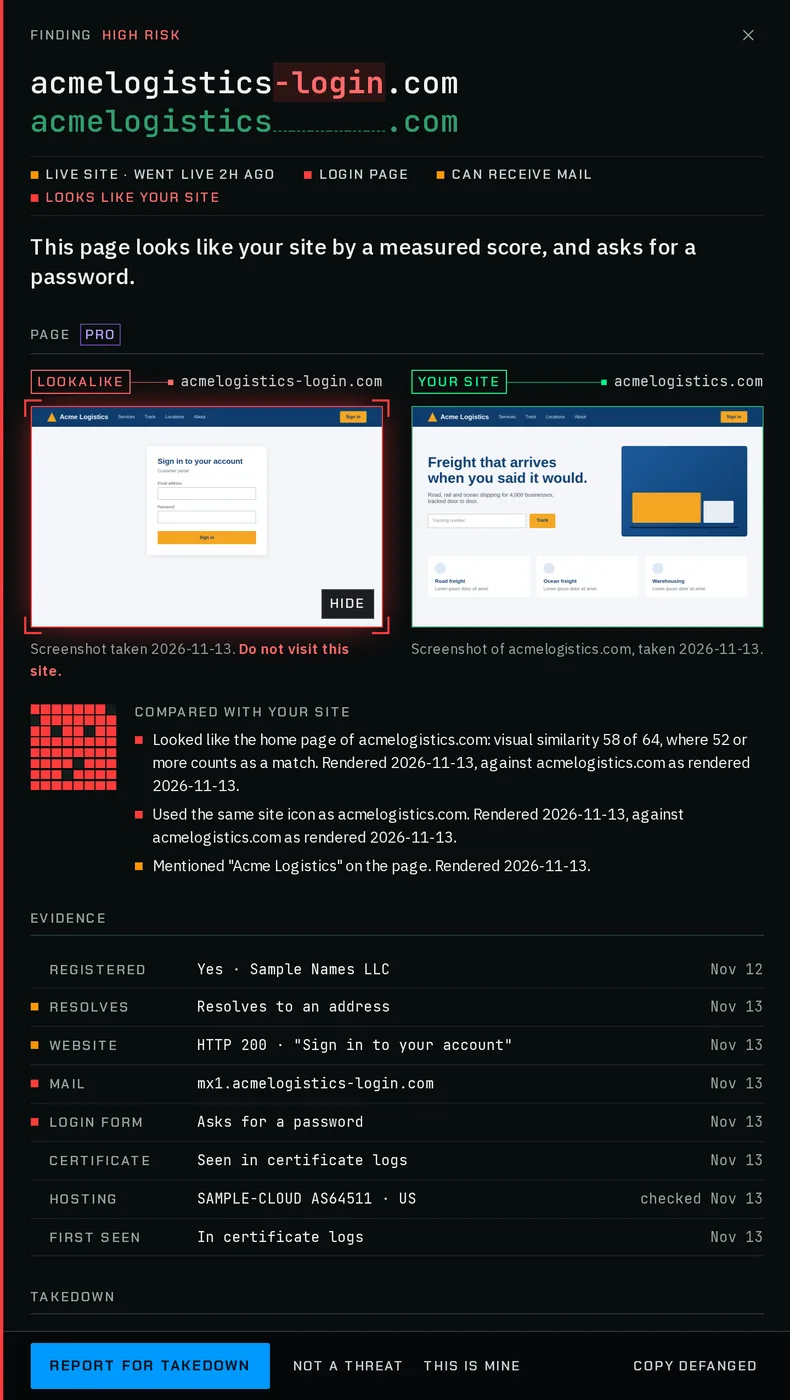
One finding, opened: a verdict in one sentence, the screenshot beside your own site, dated evidence, the takedown steps and every recorded change.
Updated
Opening a finding
Click a row in the findings list and the finding opens in a panel over the list, full screen on a phone. Escape or the close button returns to the list; if you are typing in a field, the first Escape only leaves the field. Each open finding has its own link: see links to a finding.
- Free
- Verdict, evidence, history, the takedown stages, actions
- Pro
- All of that, plus the screenshot comparison, WHOIS and written takedown reports
- Business
- All of that, plus the screenshot comparison, WHOIS and written takedown reports
- MSP
- Same as Pro
From top to bottom
- Header
- The risk, the lookalike over your domain with the changed characters marked, and the four signal marks written out: live site, login page, can receive mail, looks like your site.
- Verdict
- One sentence on what the lookalike is doing now (below). On Reported and Dismissed findings, the status follows it. A finding that shares your nameservers or registrant, or redirects to you, says so and suggests marking it as yours.
- Page
- The lookalike’s screenshot beside your site’s, and the similarity lines, on paid plans. See the Page section. Not shown for unregistered names or hosts on your own domain.
- Evidence
- One row per fact, each dated (below).
- Takedown
- The stages and where to report it. See takedown reports.
- History
- Every recorded change, newest first, in your local time. See history.
- Technical details
- Folded until you open it: WHOIS on Pro, the type of lookalike, its confidence, the domain it was compared with, the defanged name, the TLS fingerprint and other lookalikes sharing it, other names on the same certificate, and lookups on urlscan.io and VirusTotal. Those links open the third-party sites, never the lookalike.
The verdict line
The first sentence that applies is used:
- This page looks like your site by a measured score, and asks for a password.
- A look or icon match, and a password field.
- This page looks like your site by a measured score.
- A look or icon match.
- Being checked.
- The first DNS and web check has not finished.
- No longer registered.
- The domain no longer has nameservers.
- Listed on CERT Polska's Warning List.
- The domain, or a name under it, is on a public phishing list. The list is named, for example "Listed on PhishDestroy's DestroyList."
- A live page that asks for a password.
- A password field, no page match.
- A live site that can also receive mail.
- A website and mail servers.
- Went live in the last day.
- It started serving a site in the last 24 hours.
- A live site. No login form seen so far.
- A website only.
- No website, but this domain can receive mail sent to it by mistake.
- Mail servers only.
- Registered and parked. Nothing is being served yet.
- A parking page or parking nameservers.
- Registered. No website or mail so far.
- None of the above.
A page that resembles yours is always stated as a measured score with a threshold, never as a copy. Two unrelated pages with the same layout can score as similar.
Evidence rows
Each row has a mark, a label, what was found and a date. The date is when that fact was first recorded in the finding’s history where there is one, otherwise the day of the last check (“checked Nov 12”). A fact that does not apply is shown dimmed, so you can see it was checked.
- Registered
- Yes, with the registrar where known, dated by its registration date. Or "No longer registered".
- Resolves
- "Resolves to an address", or "Does not resolve".
- Website
- The HTTP status and page title, or "Parking page", or "No website".
- Its mail servers, or "No mail servers".
- Login form
- "Asks for a password", or "None seen".
- Certificate
- "Seen in certificate logs", or "None seen".
- Hosting
- The network, from IPtoASN, and the country, from IP Geolocation by DB-IP (db-ip.com), credited under the rows, or "Not hosted yet".
- Phishing list
- Shown only when the domain, or a name under it, is on a public phishing list: the list, the listed name, the date and when the entry was last seen. The list is credited under the rows, with a link to it. See Findings for the lists and how they are dated.
- Netblock
- Shown only when its address is on a public list of abusive networks, with the list.
- TLS fingerprint
- Shown only when its TLS server answers like a known malware framework's listener.
- First seen
- "In certificate logs", "In zone files" or "In our DNS sweep", and the day.
Actions
- Report for takedown
- Jumps to the Takedown section. The same as Report on the list row.
- Not a threat
- Dismisses it and returns to the list.
- This is mine
- Dismisses it as one of your own domains.
- Move back to Needs review
- On a dismissed finding, in place of the two above.
- Copy defanged
- Copies the name written with [.], safe to paste into a ticket or chat.
Report for takedown is not offered for an unregistered name or a host on your own domain. Dismissing is described in dismissing findings.